What is a call quality score? How AI call scoring works
A call quality score is a number that says how well one call met the standards you set. AI call scoring writes that number for you, by reading the call's transcript and answering your questions about it.
In TrackDrive, on offers where you've picked a scorecard, AI grades each transcribed call against it. Each call gets a 0 to 100 score whenever a question applies, a critical-fail flag, and the moment in the call behind every answer.
Why score calls at all
Listening is the slow way to check calls. One reviewer hears one call at a time, at the speed people talk.
A score turns each call into a number you can sort, filter and compare. It tells you whether a call was qualified, compliant and well handled, without anyone pressing play.
What goes into a scorecard
A scorecard is the list of questions every call is graded against. You write it, or you start from a template.
A TrackDrive scorecard holds up to 10 Yes or No questions. Each question carries two settings:
- Points. The weight of the question, so what matters most to your buyers counts for more.
- Critical, or not. A critical question is one a call must not miss. One No on a critical question fails the call, whatever its score.
Good questions are plain sentences about the call. Did the caller confirm they are shopping? Did the agent read the recorded-call disclosure? Did anyone promise a price?
One scorecard can grade many offers. An offer is the campaign the call belongs to.
Three starter scorecards
You can start from a template, then edit its questions and points, or write your own.
- Qualified Call checks that the caller is a real, in-market buyer. It has 9 questions, 100 points and 3 critical questions.
- Compliance Disclosures checks the disclosures and consent wording buyers and regulators expect. It has 6 questions, 60 points and 4 critical questions.
- Agent Quality grades how the agent handled the caller, from the greeting to the hand-off. It has 7 questions, 70 points and no critical questions.
Some of the Qualified Call questions are written for insurance calls. One asks, "Did the caller confirm they are currently shopping for insurance?" Edit them to fit what your buyers want.
How a call gets its score, step by step
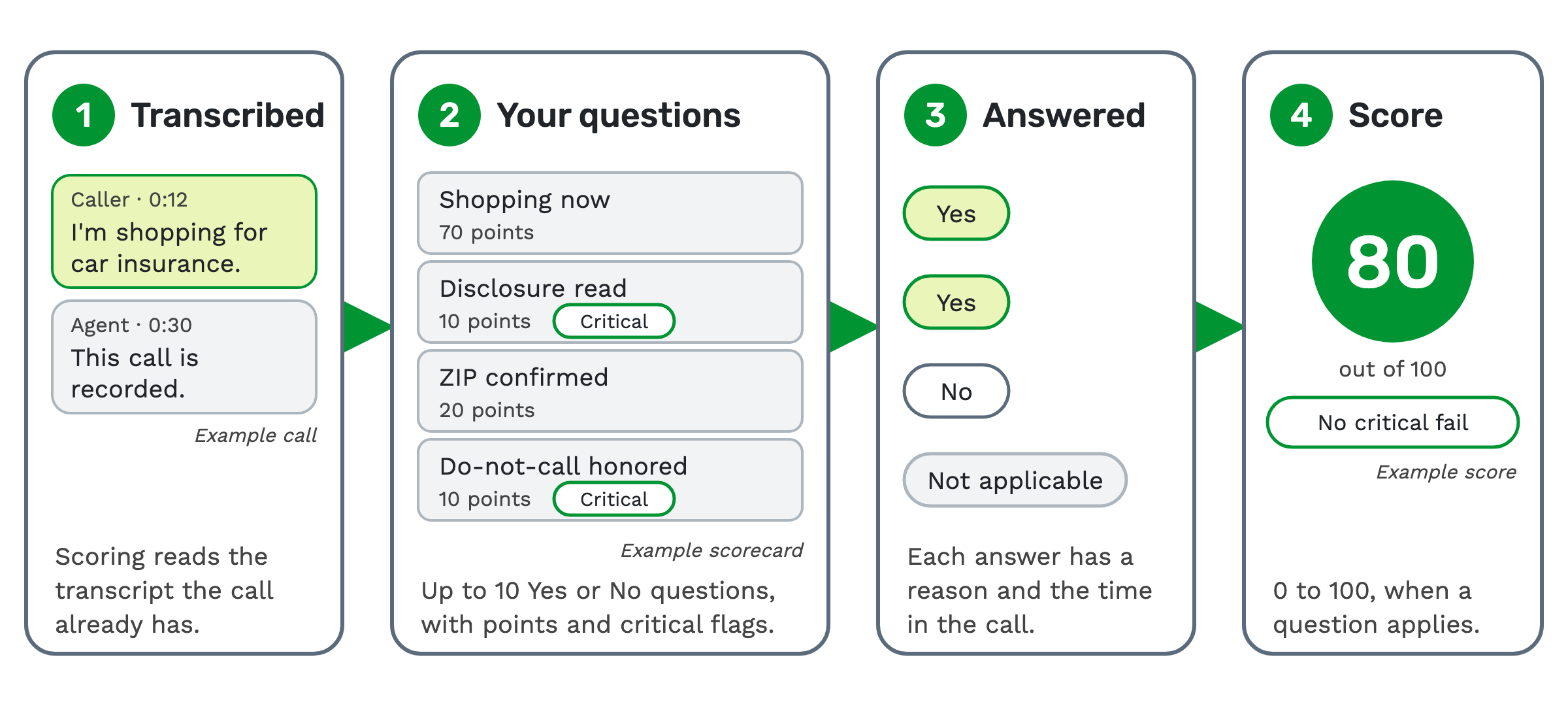
1. The call is transcribed. Scoring reads the transcript the call already has. There's no second tool and no second transcription. AI call transcription explains how that transcript is made.
2. Your scorecard's questions are read. You turn scoring on per offer, by picking a scorecard in the offer's transcription settings.
3. Each question is answered. The answer is Yes, No or Not applicable. Each answer comes with a one-sentence reason and the time in the call it rests on.
4. The call gets its score. A call with at least one question that applies gets a score from 0 to 100. A No on any critical question marks the call Critical fail, whatever its score.
Here is the example in the picture above. The scorecard has four questions, each with its own points. Two are critical: the disclosure and do-not-call.
- Shopping now (70 points): "Did the caller confirm they are currently shopping for insurance?" Yes.
- Disclosure read (10 points, critical): "Did the agent read the recorded-call disclosure?" Yes.
- ZIP confirmed (20 points): "Did the agent confirm the caller's ZIP code?" No.
- Do-not-call honored (10 points, critical): "Did the agent honor any request not to be called again?" Not applicable, because the caller never asked.
Three questions applied, so the call is scored. In this example it scores 80. Neither critical question was answered No, so it is not a critical fail.
A high score can still fail
The score and the critical-fail flag are two separate results. A call can score well and still be marked Critical fail.
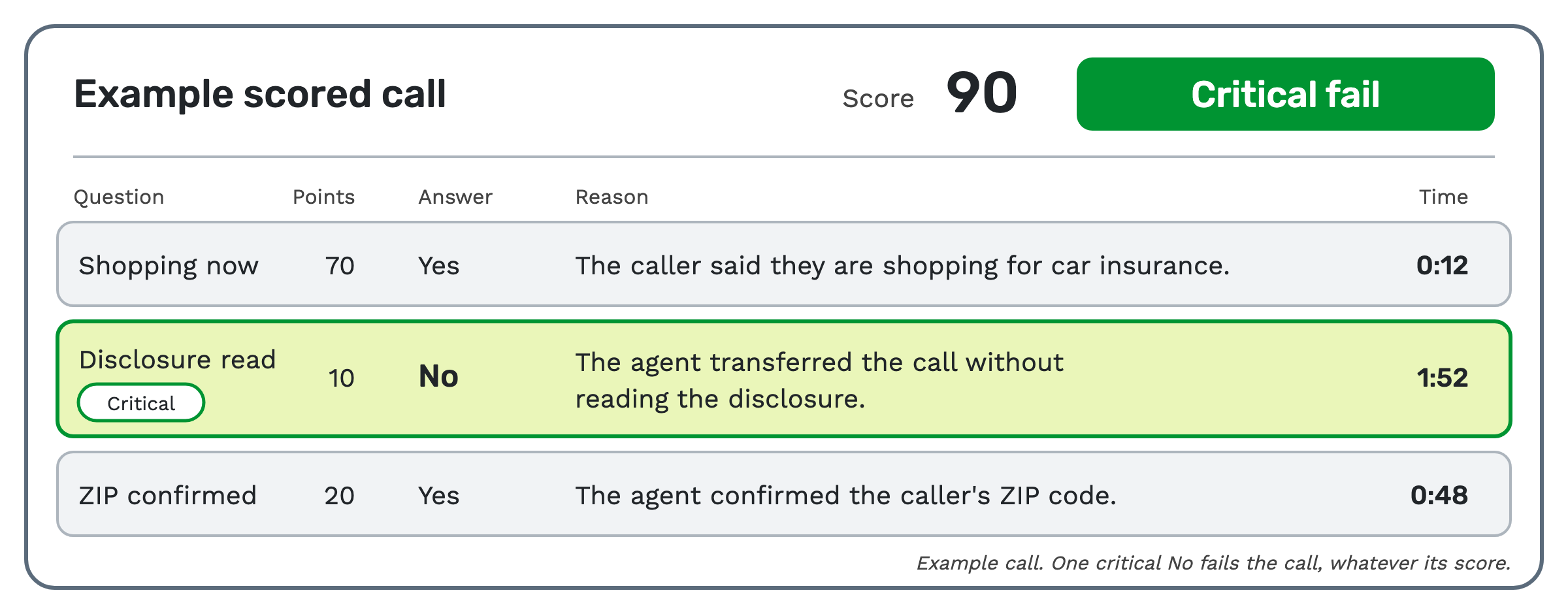 In this second example, the caller was shopping and the ZIP code was confirmed. But the agent transferred the call
without reading the disclosure. In this example the call scores 90, and that one critical No still fails it.
Every answer shows its proof
A score with no reasons is hard to trust. In TrackDrive, every answer comes with its reason and the time in the call.
Click the time to hear that moment. You can check the AI's answer in seconds, without playing the whole call.
Where the scores show up
Scores sit in four places:
- On every call, where the scorecard sits beside the transcript and summary.
- In the calls grid, as Score and Critical fail columns you can filter.
- In your own systems. Webhooks and the REST API send the score, the critical-fail flag and every answer.
- On the Call Scoring dashboard, with trends and breakdowns by agent, traffic source, buyer and offer.
The dashboard shows the average score, the critical-fail rate and each question's pass rate.
What the scores help you do
- Answer a returned call. A buyer returns a call when they won't pay for it. The call carries its score and the timestamped answers behind it, so you can show whether the caller qualified.
- Prove compliance. Mark the recorded-call disclosure, consent and no-misleading-claims questions Critical. Any call that misses one is flagged.
- Rank traffic by what was said. A publisher is the traffic source that sends you calls. Compare publishers by average score and critical-fail rate, not just call length. Inbound call tracking is how each call is tied to its source.
- Coach agents. Agents are scored on the calls they take. That works for a buyer checking a call center, or a call center checking itself.
"Call quality" can also mean the audio
Some people mean the sound of the line when they say call quality. TrackDrive measures that separately.
Every call recording carries an audio quality score from its media stats: MOS, quality, packet loss and jitter. MOS, or mean opinion score, is a standard rating of how clear a voice line sounds. Dead air and one-way audio are flagged too.
That score tells a bad call from a bad connection. The scorecard score is about what was said.
When it isn't the right tool
Scoring needs a transcript, and a transcript needs a recording. A call that isn't transcribed isn't scored.
Call recording is on by default at company level, and offers and buyers have their own Record Calls setting. Some call types, such as voice agent calls, always record. Your transcription flows then decide which recorded calls get transcribed.
Scoring also happens after the call, because transcription runs once the call ends. A call isn't graded while it's still live.
What it costs on TrackDrive
AI call scoring is a per-minute add-on to transcription, at the same rate at every commit level. It's billed only on transcribed minutes, for the offers you turn it on for.
Transcription has its own per-minute rate.
Each recording you transcribe is scored and billed separately. A call can have several: the full call, the caller with an agent, and the caller with a buyer. Your transcription flow picks which ones are transcribed.
There are no seats, no platform fees and no separate QA tool. Spend is shown on the Call Scoring dashboard. See TrackDrive pricing for every rate.
Questions people ask
Which AI scores 100% of calls? TrackDrive's AI call scoring grades every transcribed call on the offers you turn it on for. To score all your calls, record and transcribe all of them, and turn scoring on for each offer.
Is the score the same as sentiment? No. Sentiment rates the tone of a call as positive, neutral or negative. The score answers your own questions about what was said.
Can I change the questions? Yes. Start from a template and edit its questions and points, or write your own. A scorecard holds up to 10 questions.
Do I need a separate QA tool? No. Scoring reads the transcript the call already has, and the results sit beside it. See AI call scoring for the full feature.
See it in action
Request a demo for a live walkthrough tailored to your use case, or start free, with no credit card and no onboarding fee.