Pay-per-call fraud and bad calls: the warning signs and the controls that help
Pay-per-call fraud is when someone fakes or inflates phone calls to earn money they didn't earn. A bad call is wider: any call that fails the agreed rules, whether anyone meant it or not.
No control catches all of it, and none guarantees call quality. The practical job is to spot a pattern, find its source, and settle it with evidence.
Is pay per call a scam?
No. Pay-per-call is an advertising model where a business pays for each qualified phone call instead of each click. Like anything that pays on results, it can be abused.
What to do depends on who you are.
If you're a consumer with a strange charge or call. US federal rules use "pay-per-call services" for something else.
In 16 CFR Part 308, it means a service where the caller pays an extra per-call or per-time charge. Those services are reached through a 900 number or another designated prefix.
That is not the advertising model in this article.
You can report a suspected scam to the FTC at ReportFraud.ftc.gov. This is general education, not legal advice.
If you send calls and worry about not getting paid. A publisher is the affiliate or traffic source that sends the calls.
Your written agreement with the network or buyer is what settles payment.
TrackDrive tracks earnings and never pays anyone out, so your payment comes from the other party to that agreement.
Before you send traffic, get three things in writing: what counts as a billable call, how rejected calls are handled, and when payment is due.
If you buy calls and worry about paying for junk. A buyer is the business that receives a call and pays for it.
The rest of this article is for you, and for any network in the middle.
Five warning signs of bad calls
No single sign proves anything. Real people call back, and real calls end early. Look closer when you see several signs together, or the same one again and again.
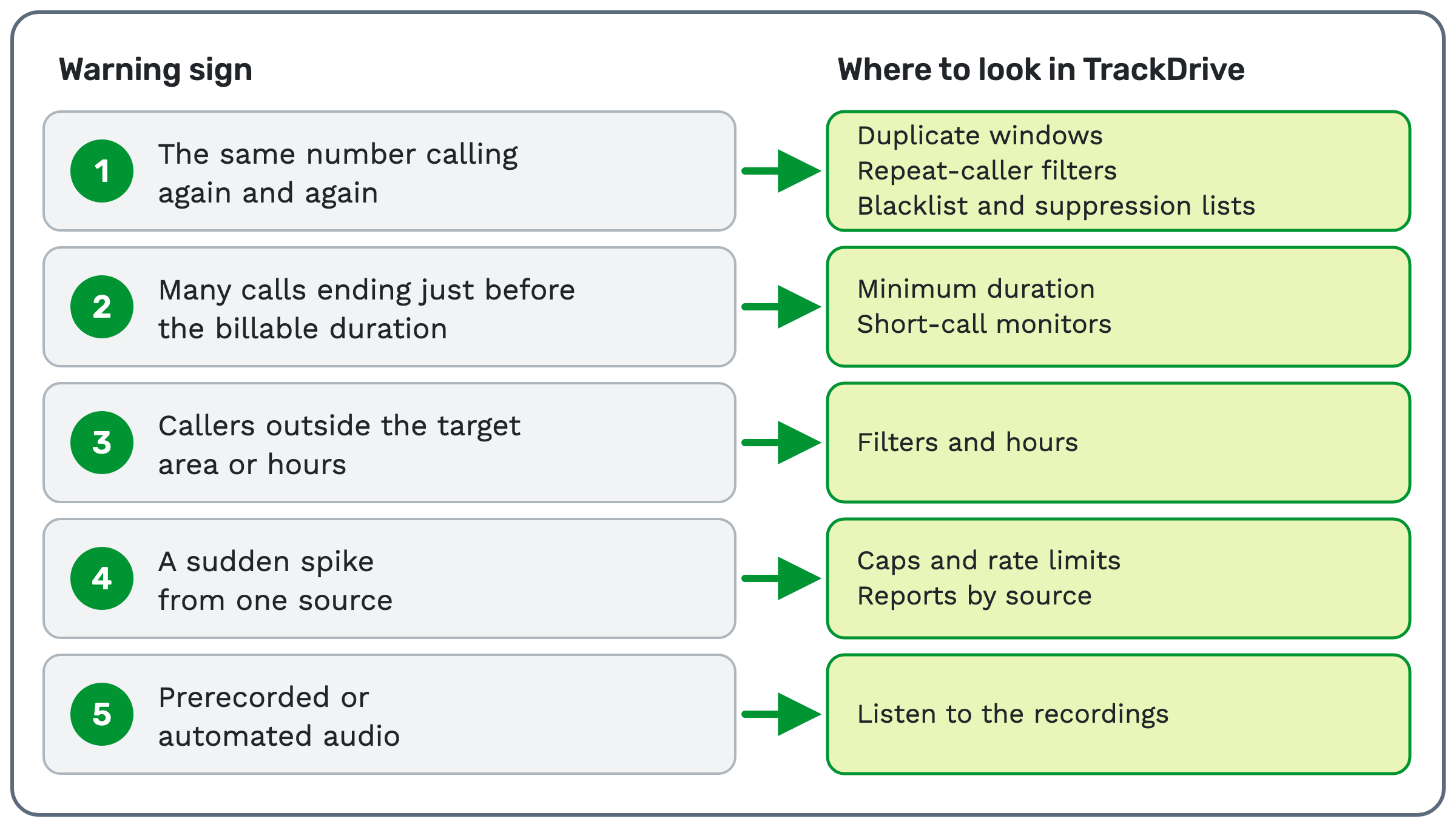
- The same number calling again and again. Someone might call back once or twice. Far more than that deserves a look.
- Many calls ending just before the billable duration. The billable duration is how long a call must last to count.
- Callers outside the target area or hours. A campaign for one state shouldn't get volume from elsewhere.
- A sudden spike from one source. Find out why before you accept the calls.
- Prerecorded or automated audio. On the caller's side, that means no real person is on the line.
What each control does in TrackDrive
As of 9 Nov 2026, TrackDrive's feature pages and help articles describe separate controls, not one fraud detector. Each one does a narrow job.
Duplicate windows
A buyer conversion is the rule that decides whether a call counts as a sale for that buyer. One of its fields is the duplicate timeframe.
The API reference defines it: "The period of time that must elapse before a buyer will pay for the same caller to be transferred."
Offer conversions have a Duplicate Timeframe field too.
Ping-post traffic has its own setting. A ping is the short message that asks buyers whether they want a call.
An inbound webhook has a setting to "Reject a ping whose caller_id this endpoint already received within the block window."
That window is set in hours or days, up to 7 days.
A separate setting also rejects a duplicate from a different traffic source. When it's off, only duplicates from the same source are rejected.
Caller ID checks
The same API reference lists narrow caller ID options, including these two. An inbound webhook can "Require a caller_id on every ping to this endpoint."
A data export can "Match calls where the caller ID was withheld or anonymous."
Neither one tells you whether a caller is genuine.
Repeat-caller filters
The calls API can filter for calls where a buyer or traffic source "had a repeat caller."
It can also filter for calls that were duplicates against a conversion's settings.
Two calls from the same number share one Contact record, so a caller's history stays in one place.
Minimum duration
The help centre calls duration the most common conversion rule: "a conversion fires once the call has been connected for at least N seconds."
If Press-1-to-accept is set up, the buyer pressing 1 starts the duration timer.
A call shorter than a duration rule's N seconds doesn't fire that rule. The rule can't tell you why a call lasted just long enough.
Short-call monitors
Monitors & Alerts watch an offer, traffic source, buyer or buyer group. A short-call monitor counts calls that last less than a length you choose, over a time window you choose.
When the count hits your threshold, TrackDrive notifies you. An alert "can also automatically pause the item it monitors, stopping traffic until you investigate."
Filters and hours
Token-based filters target calls by geography, vertical, lead quality or any custom token. A token is one named piece of call data.
A call is routed to a buyer only when it meets all of that buyer's filters.
A 7-day by 24-hour grid sets when each buyer is eligible. Calls outside those hours go to the next buyer or the exception handler you set up.
Caps and rate limits
A traffic source cap limits what one source can send. It counts conversions or connected calls, hourly, daily, monthly or in total. A total cap never resets on its own.
Rate limiting is separate. It limits ping and post requests per time window to prevent bursts.
See buyer caps and concurrency for the buyer side.
Blacklist and suppression lists
The blacklist is company-wide. TrackDrive's help article names fraud and "known bad actors" among its uses.
A suppression list blocks a number only for the buyers, offers or schedules you attach it to.
These do-not-contact tools "do not, on their own, guarantee compliance." For more on lists and disputes, see what call scrubbing means.
Reports by source
Summary reports group calls by buyer, traffic source, offer, status and dozens of other dimensions.
Attribution tokens describe where a call came from, and every call lands in the log with its custom tokens.
On leads sent by API, a sub ID identifies "a sub-publisher, affiliate, or creative within a single traffic source."
Look as closely as your data allows. A problem from one placement shouldn't count against a publisher's good traffic.
The pay-per-call numbers to watch are a good place to start.
Recordings, transcripts and scoring
Call recordings are your evidence. Listening to them is how you check that fifth sign. Check that recording is on for the offers and buyers you want to review.
Every recording carries an audio quality score, with dead air and one-way audio flagged. With AI transcription on, full-text search reaches into every transcript, so you can find calls by what was said.
AI call scoring is an add-on to AI transcription, for the offers you turn it on for.
Its Qualified Call starter scorecard is described this way: "Checks that the caller is a real, in-market buyer: shopping now, the right age and area, and willing to be transferred."
You can compare publishers by average score and critical-fail rate.
What TrackDrive's pages don't describe
As of 9 Nov 2026, TrackDrive's feature pages and help articles don't describe a built-in dispute workflow. They describe evidence for one, such as recordings and scores.
With the right permission, you can change a call's conversion by hand. The help centre says "changes are recorded so revised conversions can be traced."
The decision about who is owed what stays between you and your partner.
How to handle a dispute fairly
Here is a simple order to follow when calls look wrong.
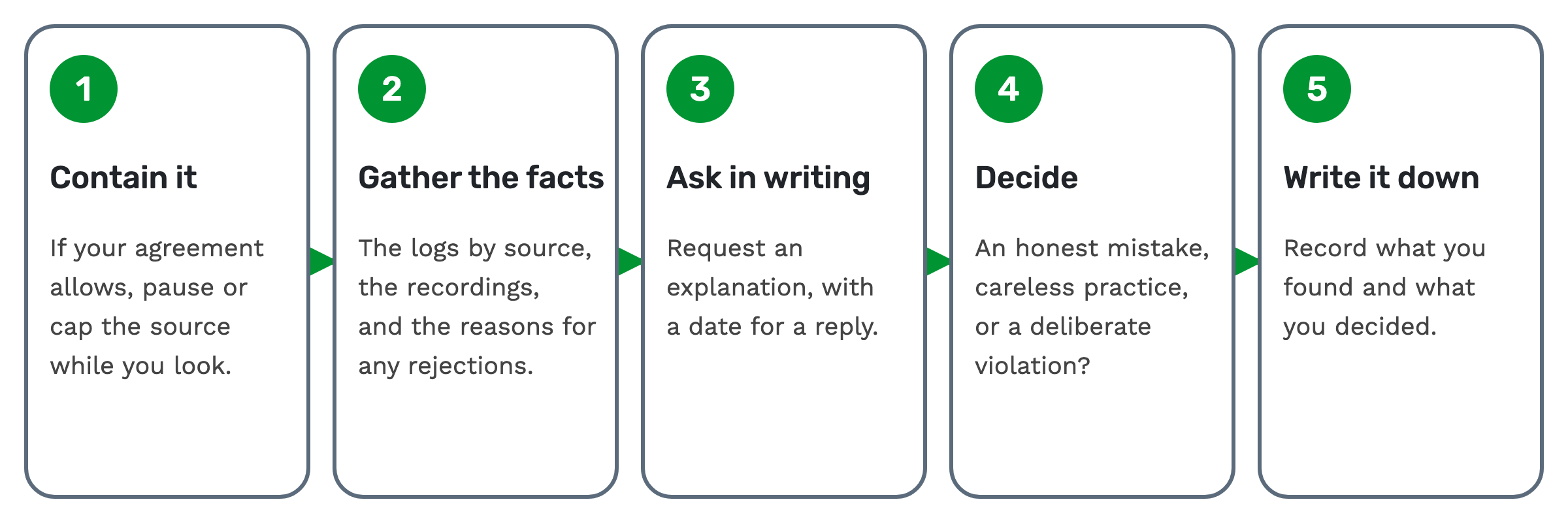 1. Contain it. If your agreement allows, pause or cap the source while you look.
2. Gather the facts. Pull the logs by source, the recordings, and the reasons for any rejections.
3. Ask in writing. Request an explanation, with a date for a reply.
4. Decide. Is it an honest mistake, careless practice, or a deliberate violation? Each deserves a different response.
5. Write it down. Record what you found and what you decided.
Name specific calls and dates when you raise it. "These calls from this source didn't qualify, and here's why" gets further than "your traffic is bad."
Questions people ask
Can any tool stop all pay-per-call fraud? No. Each control above covers one narrow case, and people can change their behaviour to get around one rule.
Does TrackDrive have a fraud score? As of 9 Nov 2026, TrackDrive's feature pages and help articles don't describe one. AI call scoring grades calls against the scorecard you write.
Does TrackDrive pay publishers? No. It tracks earnings and never pays anyone out. Your agreement says who owes you, and when.
What do these controls cost? TrackDrive pricing is usage-based, and there's no onboarding fee. AI transcription and call scoring are billed per minute. See TrackDrive pricing for current rates.
See it in TrackDrive
Request a demo for a live walkthrough tailored to your use case, or start free, with no credit card and no onboarding fee.