Call tracking software for lead generation: what changes when you sell the calls
Call tracking software for lead generation does one of two jobs, depending on whether you keep your calls or sell them.
Call tracking ties each phone call to the source that sent it. What is inbound call tracking? covers that step by step.
If you track your own ads, a marketer's tool may be all you need. This page is about the other job: moving calls between businesses, where the tracked source decides who earned what.
Two kinds of lead generation, two kinds of call tracking
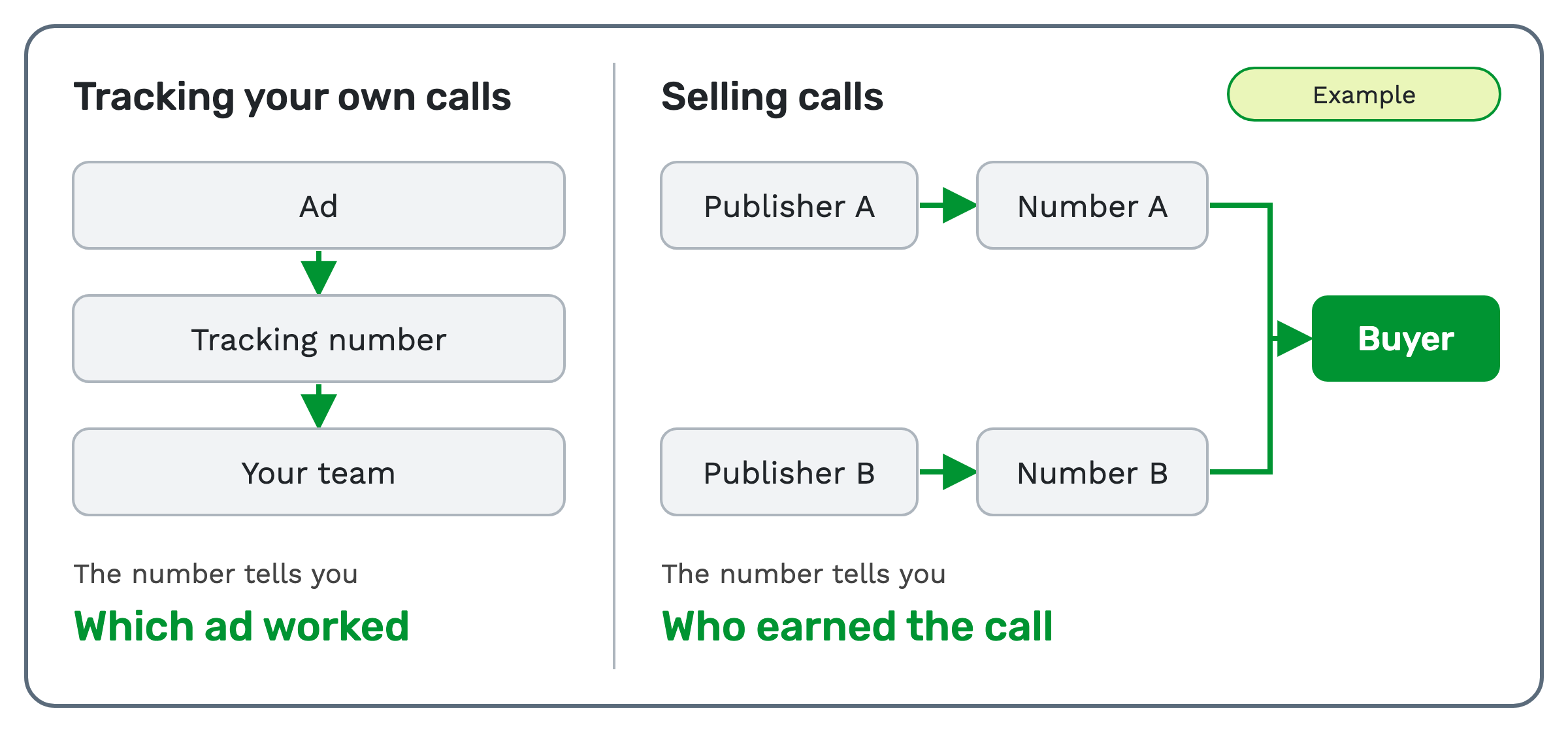
Call tracking for marketers serves one business tracking its own campaigns. The number shows which ad or keyword worked.
Operator call tracking serves people who sell or buy calls. A publisher, also called a traffic source, runs the ads and sends the calls.
A buyer is the business that receives and pays for them. A network is the business in the middle, working with both.
Asked whether it supports "pay-per-call or call marketplace routing", CallRail's guide said on 6 Nov 2026: "No. CallRail is built for marketing attribution and lead management, not pay-per-call arbitrage." (Ringba alternatives)
| Tracking your own calls | Selling or buying calls | |
|---|---|---|
| Who is involved | One business and its ad platforms | Publishers, buyers and often a network |
| What the number tells you | Which ad worked | Who earned the call |
| What a wrong source costs | A poor budget decision | A wrong payout and a dispute |
How does call tracking work?
A caller dials a tracking number, a phone number assigned to one source. The number identifies the source, the call goes on to its destination, and the result is logged. The full walkthrough has each step.
Why use call tracking when you sell calls
When you sell calls, tracking decides who gets credited. On TrackDrive, the attributed traffic source is stored on the call and used for payout calculation, cap enforcement and reporting.
- Credit. Each publisher has to be credited with the calls it sent.
- Proof. A buyer wants to know what it's being asked to pay for.
- Margin. A network has to see what's left from each publisher after payout.
Call attribution when calls are sold
Call attribution is working out which source gets the credit for a call. When calls are sold, it works at three levels.
Publisher and campaign. Give each publisher and campaign its own tracking number. An offer, the campaign a call belongs to, can have many tracking numbers. Each can carry different attribution tokens, which are key-value pairs that describe where the call came from.
Web visitors. Dynamic number insertion swaps the number on a page for each visitor. TrackDrive's version needs "a single snippet of JavaScript" and tracks "visitors from specific sources, URL keywords, and custom tokens".
Below the publisher. A sub ID is an extra tag that tells you which ad, page or placement sent the traffic. Send it as the sub_id parameter when you submit a lead by API. Calls attributed to that lead roll up under it in reporting.
Two details affect credit:
- Repeat callers. Attribution tokens persist on the contact, so a repeat caller is attributed to their original source.
- Bidding. With ping-post, buyers bid on a call before it connects. The post returns a tracking number, and the call is logged against its source.
From a tracked call to revenue, payout and margin
A tracked call doesn't earn anything until it converts. A conversion is the outcome a call has to reach to count, whatever the offer defines as a success.
Conversion drives the revenue calculation for buyers and the payout calculation for the traffic source.
Revenue is what the buyer pays for a call. A buyer conversion most often fires once the call has been connected for a set number of seconds.
That's the billable duration, the minimum talk time before a call becomes payable. A buyer can also report a conversion by webhook, and ping-post can convert a call too.
Payout is what the publisher earns: a fixed dollar amount per conversion, or a percentage of the buyer's conversion value. Amounts can differ by hour or day.
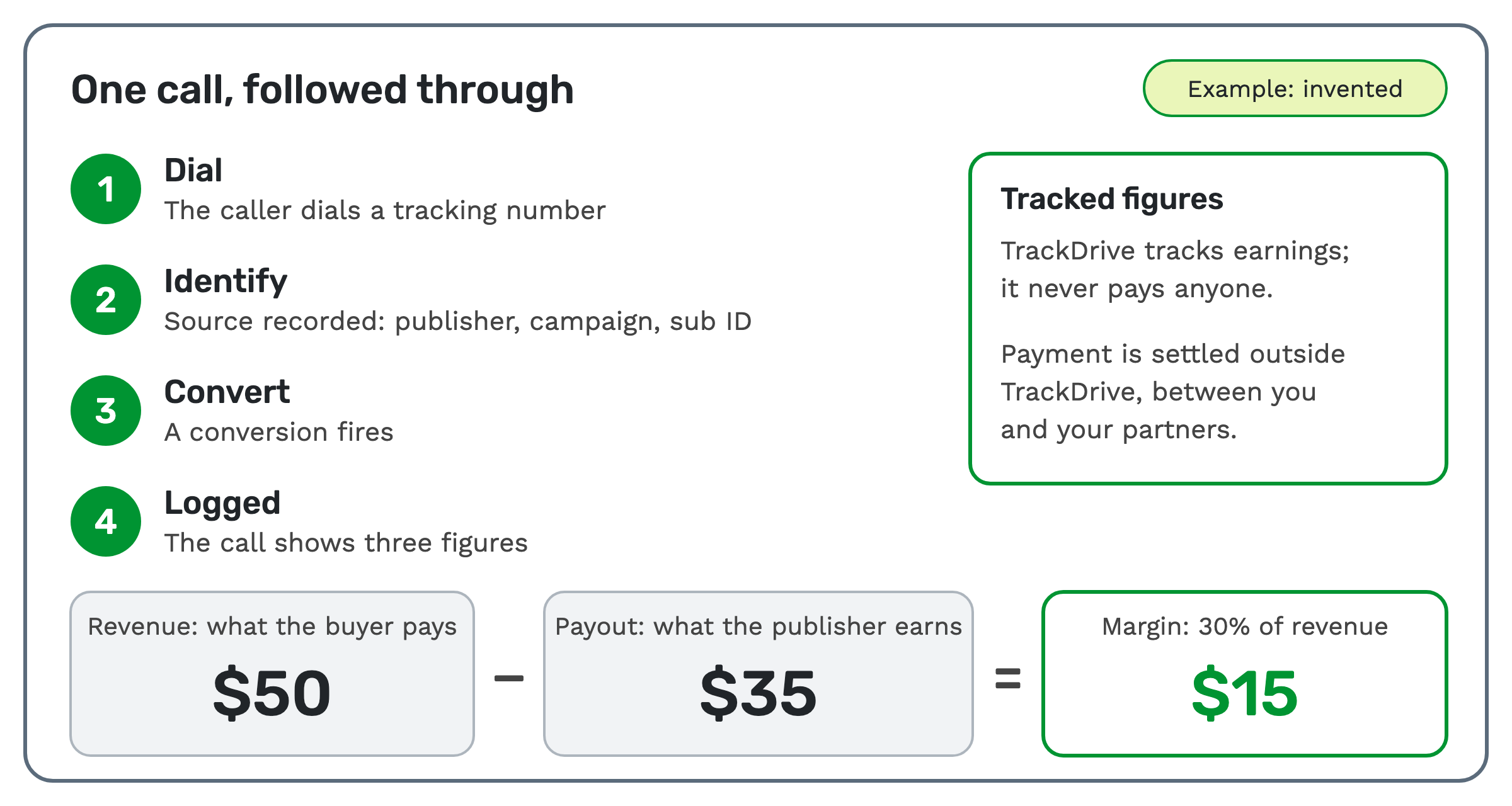
Margin is revenue minus payout. In an invented example, a buyer owes $50 on a converted call and the publisher earns $35, which leaves $15, or 30% of revenue.
The diagram follows that invented call through four steps: dial, identify, convert and logged.
 An offer-level conversion can be set to fire only when the buyer has already converted the call. That ties the publisher's payout to the buyer's conversion.
Every call lands in the log with its source, offer, buyer, timings, geography, custom tokens, revenue, payout and margin.
These are tracked figures. TrackDrive tracks earnings; it never pays anyone. Payment is settled outside TrackDrive, between you and your partners.
Caps, filters and hours decide which calls a buyer takes
Before a call connects, each buyer's filters, hours and caps are checked. A cap is a limit on how much a buyer takes.
How to route inbound calls and buyer caps and concurrency cover those checks.
Conversion rules are separate. A buyer conversion can have its own hours, so a call can connect outside them and not fire that rule.
Telling the traffic source what converted: postbacks
A postback is an HTTP callback that TrackDrive sends to a traffic source when an event occurs on its leads. The most common one is a conversion notification.
Postbacks suit calls because they run server to server. A postback doesn't depend on the caller's browser and can't be blocked by ad blockers.
It can be authenticated with a shared token that prevents spoofed conversions.
You configure one per traffic source or per offer, tied to an event such as a conversion or a conversion reversal. Webhooks for call tracking covers the wider system.
If you buy your own media, ad platforms can get the same signal:
- Google Ads. For a call on a mapped offer, TrackDrive waits three hours after the call ends, then reports it if the buyer converted. A later conversion is sent within minutes of being recorded. The integration doesn't capture the gclid, Google's click ID. It must already be in a token when the call reaches TrackDrive, and the DNI script captures it from the page address.
- Snapchat. Each offer mapping sends an event when the call starts, when it ends, or when the buyer or traffic source converts.
Inbound call analytics: four numbers to watch
Inbound call analytics means reading call data to decide what to change. TrackDrive's masterclass names four numbers to watch every week:
- Qualified rate: how much of your traffic is usable.
- Billable rate: how many answered calls ran long enough.
- Revenue per call: the average value of every call, qualified or not.
- Margin: what's left after payout, as a percentage of revenue.
Review them by publisher and by sub ID.
Live dashboards track calls, conversions, revenue, payout, cost and profit. Summary reports group them by buyer, traffic source, offer, status and dozens of other dimensions.
TrackDrive's help centre says a sub ID sent with a lead rolls up into "source/sub-source breakdowns on the reporting dashboards". Its API can group lead reports by it.
For calls, the API lists a sub ID on each call, and its Data Exports call can filter by it.
Some of the four are your own arithmetic from those counts. The pay-per-call numbers to watch every week gives the math and says which.
Proof when a buyer disputes a call
A scrub is removing or disputing a call that fails the agreed rules. When one comes up, settle it with recordings and data, not opinions.
TrackDrive can capture each side of the call separately: the agent leg, the buyer leg and the full call.
Call recording is on by default at company level, with conditions on turning it off. Offers and buyers have their own Record Calls setting, so check it's on for calls you may need to prove. Call recording for pay per call has the full rules.
AI call scoring is a per-minute add-on to AI transcription, for the offers you turn it on for. A transcribed call gets a 0 to 100 score whenever a question applies.
Where scoring is on, you can compare publishers by average score and critical-fail rate, not just call length.
Evidence doesn't settle payment on its own. Your written agreement does, so make sure it says how scrubs and rejected calls are handled.
Marketer tool or operator platform: how to choose
There's no single best inbound call tracking service. The right inbound call tracking software depends on your seat.
| Your seat | What to look for | Skip this if |
|---|---|---|
| You track calls from your own ads, and your own team answers | A marketer's call tracker | You credit publishers or sell calls to buyers |
| You send calls to several buyers | Routing, filters, caps and a conversion rule per buyer | Every call goes to one business |
| You work with publishers | A number and sub ID per source, with revenue, payout and margin per call, and postbacks | You generate all your own calls |
| Your buyers want to bid on each call | Ping-post | Your buyers don't need to bid on each call |
TrackDrive's routing, conversions, postbacks and ping-post fit the last three rows.
For the wider checklist, read what to look for in pay per call software. The comparisons with Ringba, Retreaver, Invoca and CallRail go further.
What it costs on TrackDrive
Inbound calls are billed per minute, rounded up to the full minute. The rate includes forwarding the call to your buyer over toll-free or SIP; international and premium rate centers can add cost.
Local and toll-free calls each have their own rate, and forwarding to a buyer's local number costs more. Each tracking number has a monthly rate.
There's no onboarding fee. See TrackDrive pricing for commit plans.
Questions people ask
How many numbers does each publisher need? One per publisher and campaign. For web traffic, a number pool gives each visitor session a different number.
How does attribution work when one publisher runs many ads? Use sub IDs. The publisher's number credits the publisher, and the sub ID says which ad, page or placement sent the call.
Does TrackDrive pay publishers? No. TrackDrive tracks earnings; it never pays anyone.
Learn it in the masterclass
Four episodes of the TrackDrive Pay-Per-Call Masterclass go deeper.
See it in action
Request a demo for a live walkthrough tailored to your use case, or start free, with no credit card and no onboarding fee.